
Download WebCEO – All‑In‑One SEO & Marketing Management Tool
Overview
WebCEO positions itself as a comprehensive platform that blends SEO analytics, online marketing automation, and lightweight project‑management capabilities into a single, cloud‑based dashboard. Designed for agencies, in‑house marketing teams, and ambitious freelancers, the tool lets you monitor keyword rankings, audit on‑page factors, and track backlink health while assigning tasks to team members from one virtual command center. The interface leans heavily on white space and modular widgets, allowing users to sculpt a personalized workspace that surfaces the metrics they care about most.
Although many of the raw data points are comparable to free offerings such as Google Analytics and Google Search Console, WebCEO distinguishes itself by packaging those insights alongside collaborative features—task lists, role‑based permissions, and real‑time notifications—that streamline the often‑fragmented workflow of SEO maintenance. The platform does demand a level of analytical rigor; raw numbers won’t translate into strategy without proper interpretation. Still, for teams looking to centralize reporting, reduce email back‑and‑forth, and keep an eye on both on‑page and off‑page performance, WebCEO offers a secure, regularly updated environment that can be accessed from any modern browser.
Key Features
- Rank Tracking & SERP Monitoring: Daily position updates for thousands of keywords across Google, Bing, and Yahoo, with visual trend graphs.
- Site Audits: Automated crawls that detect broken links, duplicate content, missing meta tags, and mobile‑friendliness issues.
- Backlink Analysis: In‑depth link profile reports, toxic link detection, and competitor backlink comparison.
- Content Optimization: On‑page recommendations powered by LSI keyword suggestions and readability scores.
- Social Media & PPC Integration: Connects with major ad platforms to pull spend data and evaluate ROI alongside organic performance.
- Project Management Suite: Task assignment, deadline tracking, and role‑based access that turn SEO work into an organized workflow.
- Customizable Dashboard Widgets: Drag‑and‑drop modules for traffic charts, keyword tables, and audit alerts.
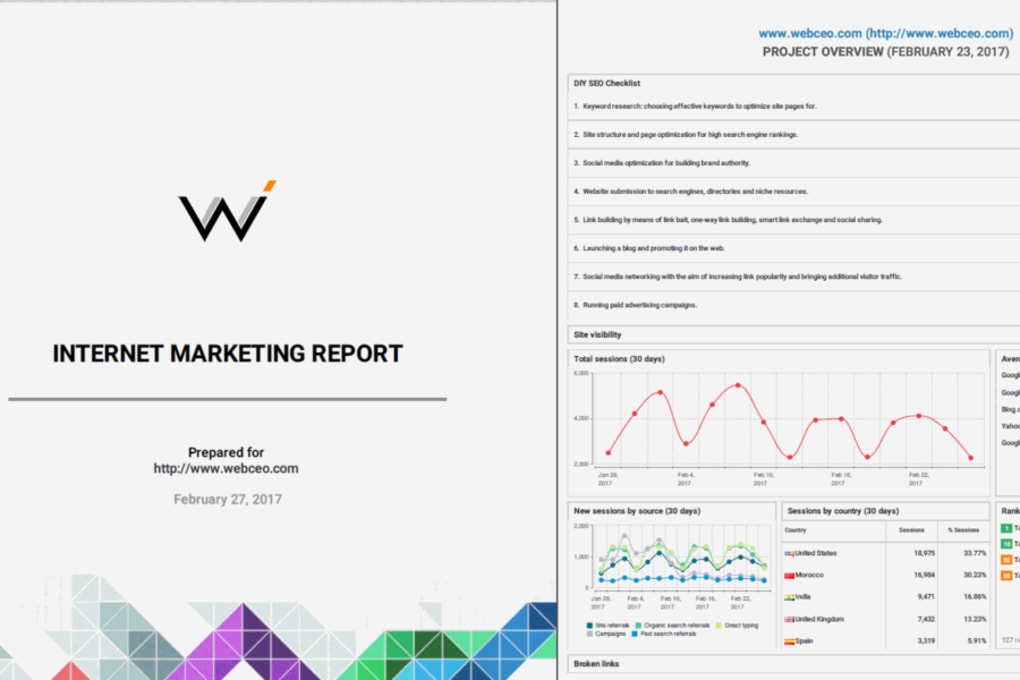
- White‑Label Reporting: Branded PDF and HTML reports that can be delivered to clients or internal stakeholders.
- API Access: RESTful endpoints for pulling data into external BI tools or custom dashboards.
- Secure Cloud Hosting: End‑to‑end encryption, regular backups, and GDPR‑compliant data handling.
Installation & Usage Instructions
Getting started with WebCEO is intentionally straightforward. Since the platform is cloud‑native, there is no traditional “installation” beyond creating an account. Begin by navigating to the official WebCEO website and clicking the Free Trial button. You’ll be prompted to enter a valid email address and create a secure password; the system immediately sends a verification link to confirm your identity. Once verified, you’ll land on the onboarding wizard, which guides you through the initial setup:
- Site Import: Add the domain(s) you wish to monitor by typing the URL and selecting the appropriate verification method (HTML file upload, DNS TXT record, or Google Search Console integration).
- Keyword Import: Upload a CSV of target keywords or connect directly to Google Ads to pull existing campaign terms.
- Team Configuration: Invite collaborators by email, assign roles (Administrator, SEO Analyst, Content Creator, etc.), and set permission levels for each module.
- Widget Layout: Drag pre‑built widgets onto the dashboard, choose data ranges, and enable real‑time alerts for ranking drops or crawl errors.
- First Audit: Run a comprehensive site crawl; the results appear within minutes, highlighting critical issues that should be prioritized.
Because WebCEO runs entirely in the browser, it is compatible with all major operating systems, including Windows 10/11, macOS Ventura and later, as well as Linux distributions that support modern browsers. Mobile access is also available through responsive design, with dedicated iOS and Android web‑app wrappers for on‑the‑go monitoring.
Daily usage revolves around a few core actions: checking the Rank Tracker for fluctuations, reviewing the Site Audit queue for new warnings, assigning tasks to team members via the Projects tab, and generating a weekly client report from the Reports section. The platform also offers a Chrome extension that overlays SERP data directly onto Google search results, making quick insights accessible without leaving the search page. For power users, the API documentation provides endpoints for programmatically pulling keyword positions, audit summaries, and backlink metrics, enabling deeper integration with internal BI pipelines.
Pros, Cons, FAQ & Final Verdict
Pros
- All‑in‑one solution reduces the need for multiple standalone tools.
- Robust collaborative features streamline SEO project management.
- Customizable dashboard lets users focus on the metrics that matter most.
- White‑label reporting is ideal for agencies serving multiple clients.
- Secure cloud hosting with regular updates ensures data safety.
Cons
- Learning curve can be steep for users unfamiliar with SEO data interpretation.
- Some advanced features (e.g., API access) are only available on higher‑tier plans.
- Free tier is limited to a single project and modest keyword volume.
- Interface, while clean, may feel less intuitive compared to niche, single‑purpose tools.
- Performance can lag when loading large audit reports on slower connections.
Frequently Asked Questions
Is WebCEO a cloud‑based service or does it require a local installation?
WebCEO is fully cloud‑based. Users access the platform through any modern web browser, so there is no need for local software installation or server maintenance.
Can I try WebCEO before committing to a paid plan?
Yes. WebCEO offers a 14‑day free trial that includes access to most core features, allowing you to evaluate the tool without providing credit‑card details.
Does WebCEO integrate with Google Search Console and Google Analytics?
Absolutely. The platform provides native connectors for both Google Search Console and Google Analytics, pulling organic traffic, impressions, and click‑through data directly into your dashboard.
What security measures does WebCEO implement to protect my data?
WebCEO uses SSL/TLS encryption for data in transit, AES‑256 encryption for stored data, routine backups, and complies with GDPR and CCPA regulations. Two‑factor authentication (2FA) is also available for all accounts.
Is there an API for exporting data to external reporting tools?
Yes. WebCEO offers a RESTful API that lets developers pull keyword rankings, audit results, backlink metrics, and more. API access is included in Enterprise‑level plans and can be added to lower tiers for an additional fee.
Professional Review
Rating: 4.2/5
WebCEO delivers a solid blend of SEO analytics and team collaboration tools that many agencies will find valuable. While the interface isn’t as razor‑sharp as some niche competitors, the breadth of features—especially the project‑management overlay—justifies the price for teams that need a single source of truth. Users willing to invest time in learning the dashboards will reap efficiency gains that outweigh the modest learning curve.
Conclusion & Call to Action
In a market saturated with point solutions, WebCEO stands out by unifying SEO tracking, technical audits, and collaborative workflow management under one roof. Its customizable widgets, white‑label reporting, and secure cloud architecture make it a compelling choice for both agencies and in‑house marketing departments seeking to streamline processes and reduce tool sprawl. If you’re ready to consolidate your SEO stack, improve team coordination, and gain a clearer view of performance trends, download WebCEO today and start your free trial. The platform’s regular updates, comprehensive support, and scalable pricing tiers ensure it can grow alongside your business, making it a long‑term investment in your site’s visibility and overall digital marketing success.



.png)



